
ACH Debit Authorization
In the KeyInsight panel
- Click the ‘Add Interaction’ icon
- In the Interaction Options window:
- Type: push down arrow or start typing to select opportunity: ACH Debit Authorization Form (O)
- Channel: will auto populate to your channel, change if needed.
- Description – enter if needed
- Explanation - enter if needed
- Check the opportunity options box
- Default and Type fields will populate automatically
- Explanation – DO NOT delete anything in this section
- ACH Debit Authorization Form: Y/N
- ACH Effective Same Day: Y/N
- ACH Effective Next Day: Y/N
-
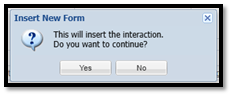
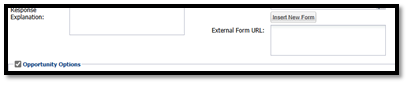
- Click ‘Insert New Form’ above the Opportunity Options section
- Answer ‘yes’ if you have finished filling out the interaction portion
- Answer ‘no’ if you need to add anything additional to the interaction portion
- Insert Form
- The ‘process form’ window will open
- On the left side
- Form Type: EFT_ACH Debit Authorization
- On the right side
- Primary Record – Type and select the member number
- Select the Share: S 0001 First Forward Savings
- Click continue
- On the left side
- Document window will automatically pop up
- If it does not, minimize window. You may need to allow the pop-up
- Fill in document
- Once completed – click ‘Lock Form-Not Sigs’
- Sign Document
- Sign using Signature Pad:
- Click on the signature line that says “Sign Here”
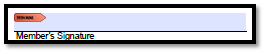
- Click on the signature line that says “Sign Here”
- Sign using Signature Pad:
- Click ‘Insert New Form’ above the Opportunity Options section
-
-
-
- Follow the prompts for member to sign
- Click ‘accept’
- Box will populate, confirming signature has been obtained
-
- Click ‘Submit Form’
-