
Promise to Pay
Members must be at least 1 day delinquent to add a promise to pay
If member is 30+ days delinquent, we must get them in contact with Member Solutions
- Open a Transaction work area and search for the member
- Navigate to Additional Options > Collections Review
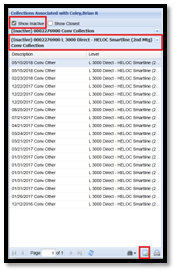
- Select Show Inactive and click on the loan the promise to pay should be added to
- At the bottom of the page, click on the paper icon to Add Activity
- Insert Collection Activity
- Activity Type: Promise Made
- Explanation: Not Required
- Promise Date: Date Member is going to Make Payment
- Activity Level: Loan
- Click Update
- At the bottom of the page, click on the paper icon to Add Activity
We do not need to reach out to Member Solutions to let them know a promise to pay has been added