
Adding Seller Information for LPOA
The Limited Power of Attorney must be signed before funding the loan and is needed for all Private Party Sales. If Title has more than one owner and is listed as “AND” we need a form for all owners.
What we need from the Seller
- Name
- Address
- Email Address
- Phone Number
How to add this information to MeridianLink
- In the upper right-hand corner of the Processing Page, Click “View Contacts”
- Under “Additional Contacts” use the drop down to select “Seller” > Click “Add Contact”
- Add the Seller’s Contact Information > Click “Save”
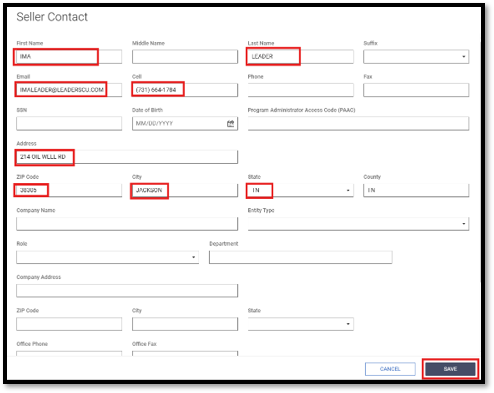
- When you are back on the “Contacts” Pop-up, Click the three dots beside the seller information you just added > Click “Clone”

- Use the drop down to select “Titled Person” > Scroll down and select “Clone”
- Your contact should now be added as the “Seller” and “Titled Person”

- On the Processing Page, select the appropriate processing type (Member Lien Processing or Member Processing) and fill in the required fields
- Vehicle Title
- Current Name on Title – Select Seller’s Name
- New Name on Title – Select Purchaser’s Name (Our member)
- Name for Collateral Purpose – Select Purchaser’s Name
- Current Title State – TN (Always TN even if titled in a different state)
- New Title State – TN (Always TN even if titled in a different state)
- Seller Information
- Seller Name – Select Seller’s Name
- Co-Seller Name – Additional Owner (If Applicable)
- Lienholder Information – From 10-Day Payoff Letter (If Financed)
- Lienholder – Lienholder Name
- Name on Account – Select Seller’s Name
- Account Number – Enter Account Number
- Payoff – 10 Day Payoff Amount
- Payoff Date – Date that the Payoff is Good Through
- Payoff Per Diem – Interest Amount Per Day
- Vehicle Title
- The processing Page should look like this once completed:
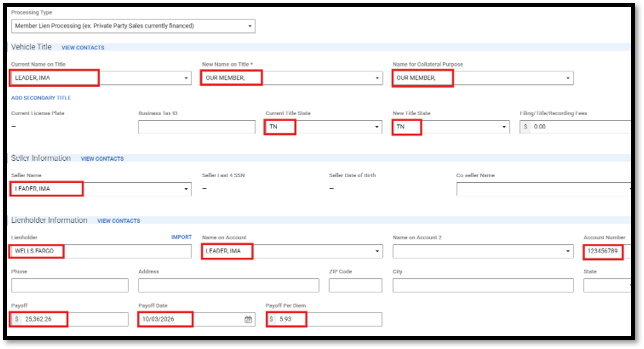
This information will map to the Seller LPOA Form and Payoff Letter
Different Processing Types will prompt different information to be put in - this is just one Example