Bad Address Job Aid
Returned Mail
- Open a Transaction work area and search for a member
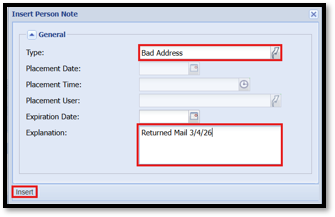
- Add an Alert on the account regarding bad address
- Person Panel – Click the Blue Banner in the Alerts Box to Insert Person Note
- Type: Bad Address
- Explanation: Returned Mail (Enter Date)
- Insert
- Open the Relationship Tree
- Left Click on the First Forward (Prime) savings to open the Update tab
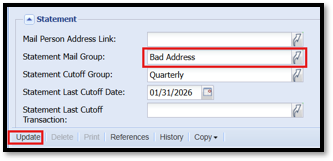
- Navigate to the Statement Section of the share record
- Statement Mail Group: Bad Address
- Update – (No need to do this on all shares – Just the First Forward)
*IMPORTANT: Do not mark the address as “Bad Address” in the Address Box in the Personal Panel*
Deceased Accounts – Hold Statements
- Open a Transaction work area and search for a member
- Open the Relationship Tree
- Left Click on the First Forward (Prime) Savings to open the Update tab
- Navigate to the Statement Section of the share record
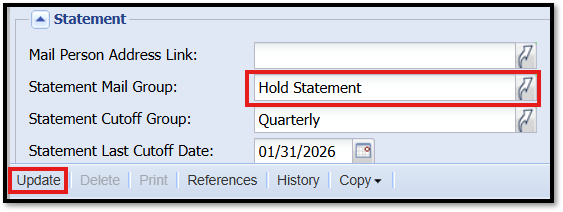
- Statement Mail Group: Hold Statement
- Update