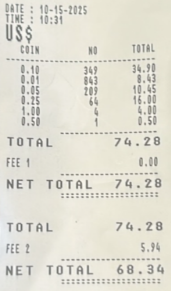
Coin Machine Transactions
Existing Member
- Open a Transaction work area, pull up existing member’s account
- Use transaction code CR (cash received)
- Enter the ‘net total’ amount listed on coin receipt
- Tab to add to ticker
- Transaction code, D (Deposit) or MD (Machine Disbursed) to offset transaction
- Add to ticker
- Post
- Perform a money movement from the teller drawer to the coin machine. You will list the ‘Total’ amount used on coin receipt. Put the amount in the unspecified section.
Non-Member
- Open a Transaction work area, pull up or create non-member shell record
- Use transaction code CR (cash received)
- Enter the ‘total’ amount listed on coin receipt
- Tab to add to ticker
- Use Transaction code F (fee)
- Fee: N1 Non-Member Coin Fee
- Share or Loan: choose ‘other’
- Enter the amount of the fee listed on coin receipt
- Tab to add to ticker
- Use transaction code MD (machine disbursed) to dispense remaining amount back to non-member
- Select denominations
- Add to ticker
- Post
- Perform a money movement from the teller drawer to the coin machine. You will list the ‘Total’ amount used on coin receipt. Put amount in the unspecified section.