
Debit Card Limit Increase
*Always contact EFT FIRST to get approval before increasing the limit on a debit card*
1. Open a Transaction Work Area
2. Navigate to Additional Options à Card Relationship
3. Click on the Card Number to open the Card Record/Card Subrecords
4. Under Card Subrecords, scroll down to Limit Records and Click + to Add
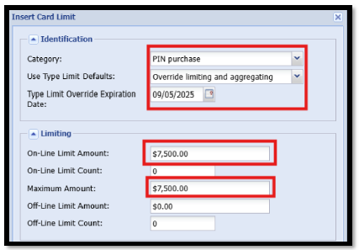
5. Insert Card Limit:
- Category: PIN Purchase
- Use Type Limit Defaults: Override limiting and aggregating
- Type Limit Override Expiration Date: Enter tomorrow’s date
- On-Line Limit Amount: Enter Increased Amount
- On-Line Limit Count: 0
- Maximum Amount: Enter Increased Amount
- Off-line Limit Amount: $0.00
- Off-line Limit Count: 0
- Click Insert
*No other fields need to be changed*
*Repeat the same steps for Signature Purchase*
*For ATM Limit Increase – the Category will be ATM Withdrawal – Same fields need to be updated*
*Be sure to add Travel Strategy in Client Central*