
Loan Modification – Adding a Borrower
No Application Needed
Loan Officer
- Collect information from borrower being added to loan
- This should be the same information we would ask for when taking a loan application – Obtain ID
- Create a Shell Record for the additional borrower and upload image of ID
- Insert Keyinsight: Loan Modification – Adding a Borrower
- Be sure to verify all email addresses before inserting Keyinsight
- Notate in Keyinsight:
- Loan Number
- Additional Borrower’s First & Last Name
Loan Ops
- Add Additional Borrower in Keystone
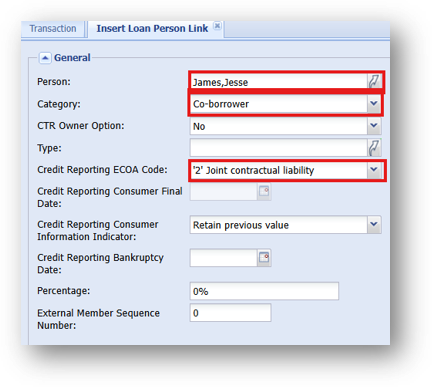
- Go to the Relationship Tree – Right Click on Loan > Insert > Insert Person Link > Insert First
- Pull in the New Borrower’s Person Link
- Category: Co-Borrower
- Credit Reporting ECOA Code: “2” Joint Contractual Liability”
- Insert
- Go back to the Relationship Tree - Left Click to Update Loan
- Find the Credit Reporting Section in the Loan Record
- Create Sub Action form and email to both the current borrower and additional borrower for signatures
- Be sure we receive the signed form