
Loan Modification – Rate Decrease
New Loan Application Required – Pull Credit
This job aid is for when we are handling as a loan modification. This will sometimes be handled as a new loan if multiple changes occur. Underwriting will advise.
Loan Officer
- Submit New Application in MeridianLink to get approval on lower rate
- Discuss new Rate/Payment with member
- Make sure Keystone has the correct email address for all borrowers
- If member wants to move forward, send Application to Processing Queue with the following comments for Loan Ops:
- Sub Action Docs:
- Signing Method –
- New Rate –
- New Payment –
- How Loan Fee & Unpaid Interest will be paid –
- Sub Action Docs:
- Funding Page:
- Approved Amount: Bal + Interest Due (if including interest in loan)
- Include DP if included on current loan
- Loan Fee: Add if including in loan
- Due Date: Enter due date on current loan
Loan Ops
- Create Subsequent Action Form and email to all borrowers
- Once Subsequent Action Form is signed, perform loan maintenance in Keystone
- Open to the Relationship Tree and Left Click to Update Loan Record
- At the bottom of the page click PROJECT
- Click Project New
- This will open a tab at the bottom that will allow you to see all of the details of the current loan before modifications
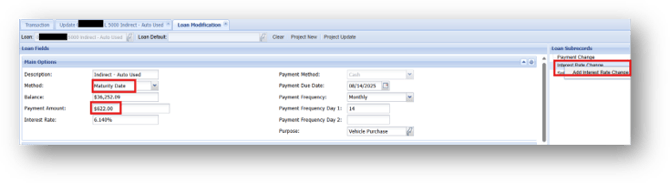
- Under Main Options
- Change Method to Maturity Date
- Change Payment Amount to what calculated in Meridian Link
- Make sure to calculate with current loan due date
- Under Loan Subrecords
- Right Click Interest Rate Change – Add Interest Rate Change
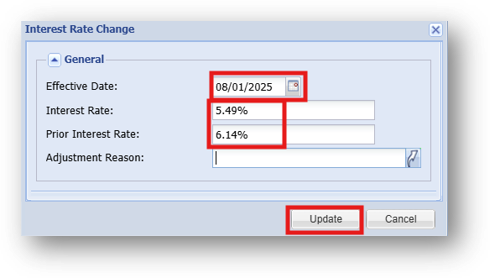
- Interest Rate Change
- Effective Date: Date we are making the change
- Interest Rate: New Rate
- Prior Interest Rate: Previous Rate (Can see in Background)
- UPDATE
- Click Project New
- This will open a second tab showing the changes being made with the modification
- Make sure that the maturity date is staying the same and the only changes being made are to the payment amount and interest rate
- Click Modify Loan
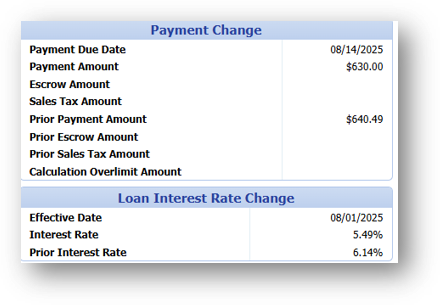
- Verify the Loan Before and After Modification Details
- Loan After the Modification will show the Payment change and Interest Rate at the bottom
- Click Post Modification
- Payment Change and Interest Rate Change will show in Relationship Tree